Pointers is an important and difficult part of C programming. This lecture covering nearly all aspects of points is good start to learn, but not deep enough. And the problem sets and lab for this lecture is all about file pointers. Therefore, I recommend Coursera course “Pointers, Arrays and Recursion” by Duke University as supplementary material. The notes can be found here(pointers), which only covers knowledge that is not mentioned here.
Hexadecimal
Hexadecimal is a numbering system with base 16, where there are 16 digits:
0 1 2 3 4 5 6 7 8 9 A B C D E F
In order to distinguish hexadecimal system from decimal system, we add 0x in front of hexadecimal values.
Why 16? Because a group of 4 binary digits(bits) has 16 different combinations, and each of those combinations maps to a single hexadecimal digit.
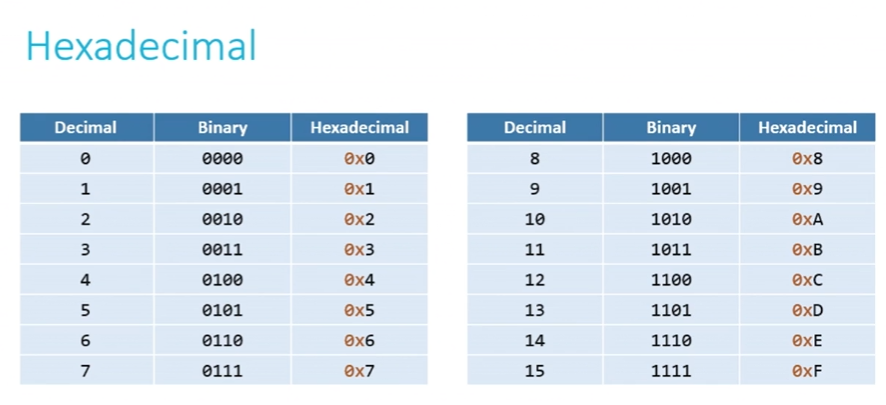
In order to convert a binary value to a hexadecimal value, we first divide it into groups of 4 digits, convert every group of digits to decimal values, and then convert it into hexadecimal values.
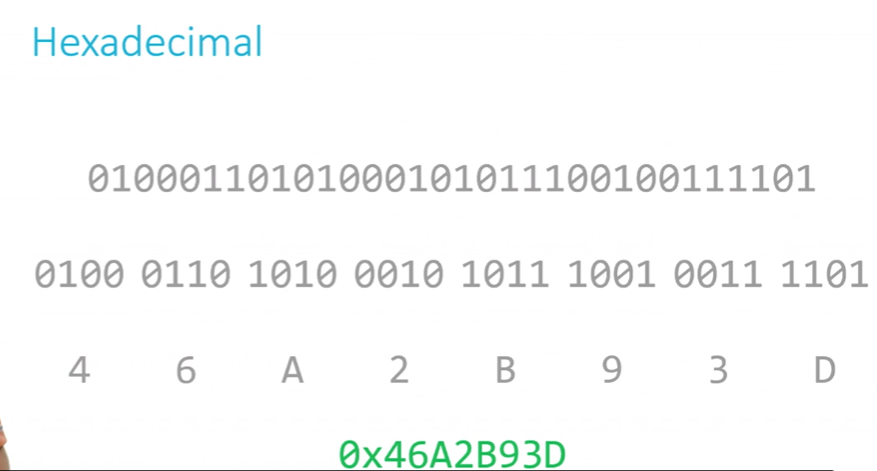
It can be used to represent large numbers with fewer digits, but the values in a computer’s memory are still stored as binary.
Pointers
A pointer is a variable that stores an address in memory, where some variable might be stored.
There are two relevant unary operaters: & giving an arrow point at and * following the arrow.
There are three basic pointer actions — declaring, assigning (including initializing), and dereferencing.
Declaring a pointer
In C, “pointer” (by itself) is not a type. It is a type constructor — a language construct which, when applied to another type, gives us a new type. For example, the code char * my_char_pointer; declares a variable with the name my_char_pointer with the type pointer to a char (a variable that points to a character). The declaration of the pointer tells you the name of the variable and type of variable that this pointer will be pointing to.
Notice, int* x, y actually declare x as a pointer pointing to integer and y as an integer. If you want to declare x and y both pointers, use int* x, * y instead.
Assigning to a pointer
If you don’t initialize a pointer, it will point to a random address, which might cause a crash.
What does xPtr = &x means? It gets the address of variable x by &x and then assign it to a pointer variable xPtr that points to an int.
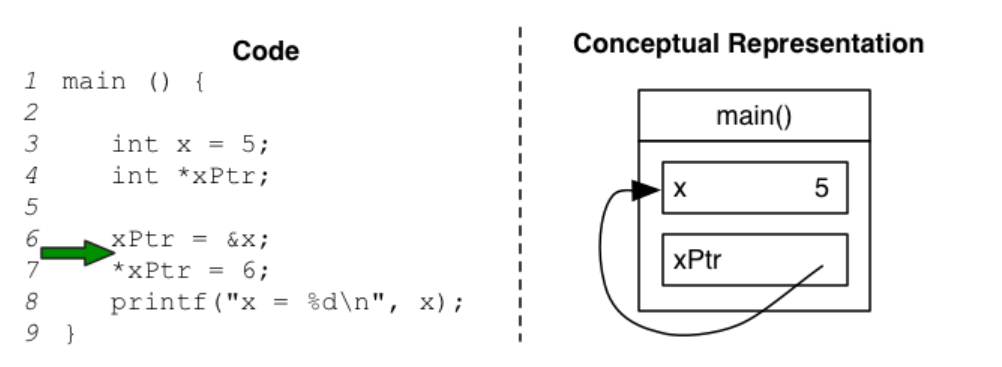
It is important to note that the address of a variable is not something that can be changed by the programmer. The code &x = 5; will not compile. A programmer can access the location of a variable, but it is not possible to change the location of a variable.
Notice, you can only assign addresses of lvalue to pointers.
What is lvalue?
- object that has an identifiable location in memory, which means having an address.
- lvalue cannot be a function, expression(like
x+y) or a constant(like3)
For example, int *b = 42; is illegal because the type of 42 is not the same as the type of b. int *b = &42 is also illegal because 42 is not a lvalue, so it doesn’t have an address that can be got by &.
Dereferencing a pointer
Once we have an arrow pointing at a box, we want to read or change the value in the box by following the arrow. “Following the arrow” is accomplished by unary operator *. So * can not only declare a variable as a pointer, but also dereference the value stored in that address.
Generally when you work with pointers, you will use the * first to declare the variable and then later to dereference it. Only variables that are of a pointer type may be dereferenced.
    #include <stdio.h>

    int main(void)
    {
        int n = 50;
        int *p = &n;
        printf("%p\n", p);
        printf("%i\n", *p);
    }
    //results:
    //0x7ffda0a4767c
    //50
If we want to print the address of a variable, use %p in printf.
Pointers as function parameters
Pointers provide an alternative way to pass data between functions:
- When we pass data by value, we only pass a copy of that data. So if we change the values in a function that takes values as inputs, it won’t change the values of the actual variables.
- If we use pointers instead, we have the power to pass the actual variable itself. That means if we change the value of it in one function, it impacts what happens outside this function.
For example, we can swap the values of two variables now:
    void swap(int *x, int *y) {
      int temp = *x;
      *x = *y;
      *y = temp;
    }

    int main(void) {
      int a = 3;
      int b = 4;

      swap(&a, &b);
      printf("a = %d, b = %d\n", a, b);
      return EXIT_SUCCESS;
    }
scanf
Remember the & we use in scanf("%d", &x), now we know what &x represents – it represents the address of variable x. As we say in subsection “Pointers as function parameters”, if we want to use function scanf to assign input to variable x, we need to pass the address of that variable in instead of a copy of variable.
Pointers in hardware
(Byte)Addressing
The hardware names each location/space in memory by a numeric address which refers to 1 byte of data. So this type of storing is called byte-addressable memory.
Given that addresses are 32 bits in 32-bit machine, so their pointers are always 4 bytes no matter how much size of the data it points to. (Same as in 64-bit machine).
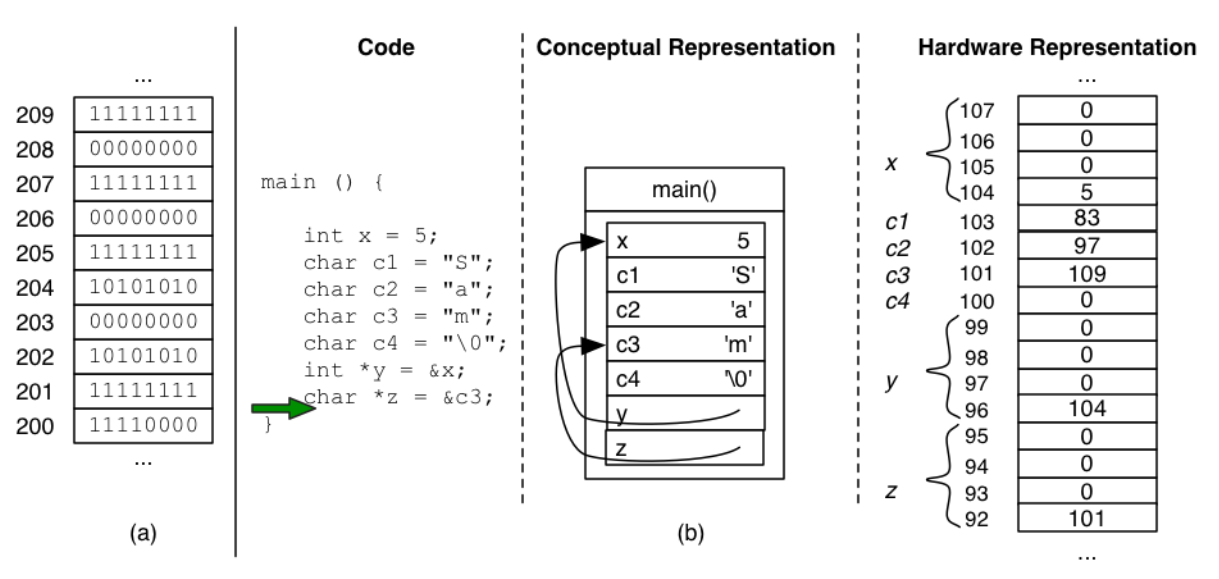
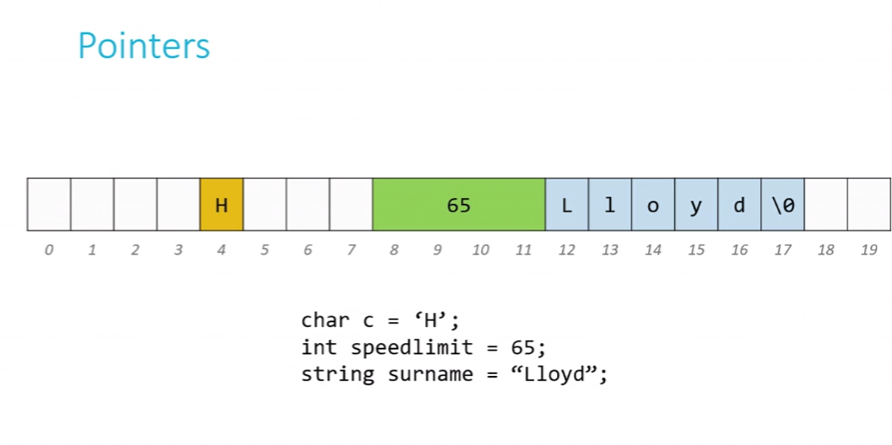
And the memory we are mentioning here is RAM(random access memory), the only place that data can be manipulated and used. But your files are stored on your disk drive(HDD or SSD), so when you run the program, the data should first be moved to RAM.
A program’s view of memory
In the figure in the last function, variables are declared in the order x -> c1 -> c2 -> c3 -> c4 -> y ->z, however, the order of their addresses is reversed(x has the largest address and z has the smallest address). Why?
It turns out that it is related to how the program stored in memory.
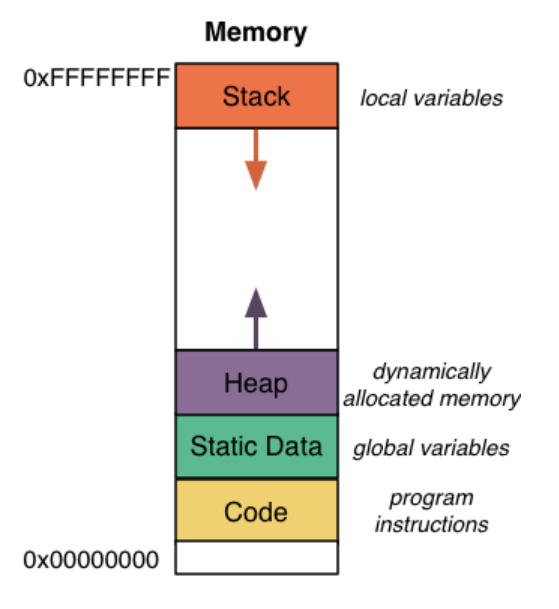
The location 0x00000000 under the Code portion is left for NULL pointer.
The code like code in C will be compiled into object code, and each encoded instructions in the object code is assigned an address in memory when we run the program. These encoded instructions live in the Coder portion of memory, shown in yellow in the figure above. The first instruction will be stored at the bottom of this memory figure with small address value, then the second instruction will be stored up next to the first instruction, ect.
The green portion next to code portion is used to store static variables in the program.
The static data area contains variables that are accessible for the entire run of the program (e.g. global variables). Unlike a variable that is declared inside a function and is no longer accessible when the function returns, static variables are accessible until the entire program terminates (hence, the term static ). Conceptually, a static variable’s box remains “in the picture” for whole program, whereas other are usable for only a subset of the program’s lifetime.
Dynamic-allocated memory is stored in a Heap as the purple portion, while local variable is stored in a Heap as the orange portion. Actually, the Heap portion and the Heap portion share the same chunk of memory; they can meet against each other in any point of this chunk when this chunk is run out.
Call stack
When you call a function, the system sets aside chunks of memory, which we call as function frames or stack frames, for that function to do its necessary work. Here is a situation where function main calls function move(), which calls function direction(), etc. All these called functions have open frames but only one frame can be active at a given time.
As we can see from its name, these frames are arranged in a stack. According to the characteristic of a stack, the function that is recently called will be on the top of the stack(the arrow of the stack in the figure above points the direction of frames coming into the stack). If this called function finishes its execution, its frame will be popped off of the stack, and the frame immediately below it becomes the new, active function frame on the top of the stack; if a new function is called, a new frame is pushed onto the top of the stack and becomes the active one.
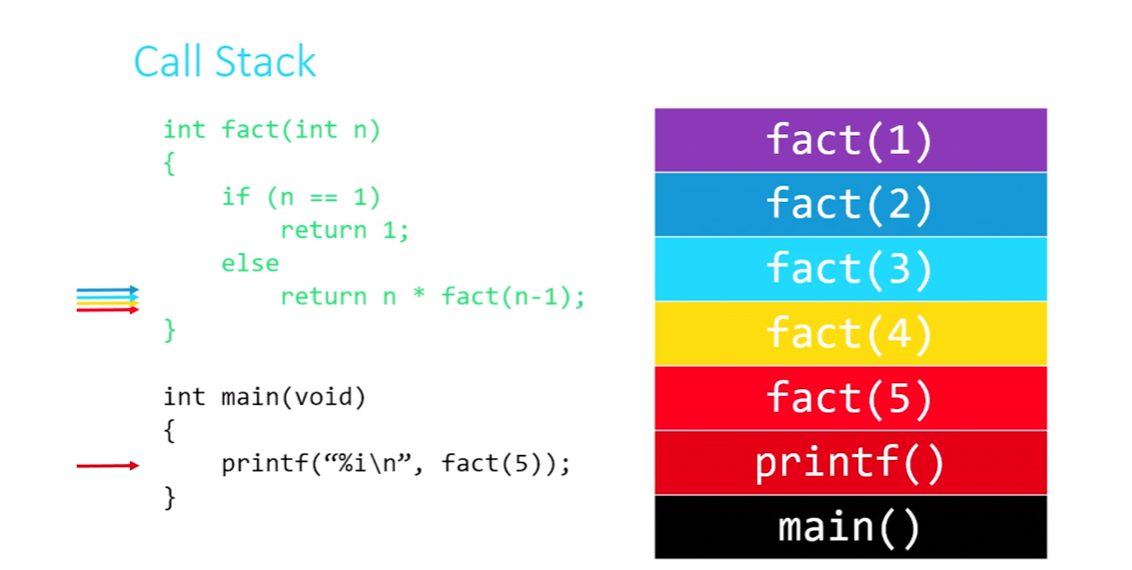
Let’s take a step further and see how recursion works in the view of memory.
The figure below shows the positions of frames of called functions in the stack. Once fact(1) returns a value(which means it finished its execution), its frame will be popped off the stack, then fact(2), fact(3) etc.
NULL
NULL points to nothing, it’s a special value of all 0 bits. When we declare a pointer and we don’t know where it should point to at this moment, we should always set the value of the pointer to NULL. Because NULL doesn’t point anywhere, so if we try to dereference a pointer whose value is NULL, it will raise Segmentation fault. So when you just declare a pointer and set it to NULL, you won’t worry about that the pointer is pointing to a random place(the values stored there are called garbage values) which might mess up something we don’t know and cause accidental danger.
Therefore, NULL is very useful instead of wasting bytes in memory.
The NULL pointer has a special type that we have not seen yet—void . A void pointer indicates a pointer to any type, and is compatible with any other pointer type—we can assign it to an int *, a double, or any other pointer type we want. Likewise, if we have a variable of type void *, we can assign any other pointer type to it. Because we do not know what a void * actually points at, we can neither dereference it (the compiler has no idea what type of thing it should find at the end of the arrow), nor do pointer arithmetic on it.
Pointers and Arrays
An array’s name is actually a pointer to its first element. The difference between array and a normal pointer is that an array x which is declared by int x[] actually is a constant pointer int *const x, so the array name x can not be assigned by another array.
Notice, if you declare char *s = "Hello;", "Hello" is in code portion of memory, and it’s read-only; s is in stack portion of memory. It’s actually char* const s even if const can be omitted.
Size of string
String is actually char* type, it’s defined as typedef char* string in
Dynamic memory allocation
If we don’t know the precise value of address pointed by the pointer or the exact size of that space pointed to when we declare the pointer, then we can use pointers to get access to a block of dynamically-allocated memory at runtime.
How do we get dynamically-allocated memory? Use function malloc(s) from C language Standard library (#include<stdlib.h>) where s is the number of bytes requested. And this function malloc will return a pointer to that memory if it can obtain the memory. But not all request will be satisfied. When there is no available memory for you, it’ll hand you back to NULL. So be sure to check where your pointer is pointing after malloc by if (your_pointer == NULL).
When a function finishes execution, all memory, except dynamically-allocated memory in it, will be returned to the system for other use. If you want to return the dynamically-allocated memory back in order to avoid a memory leak, use function free() to release this memory.
Notice,
- Every block of memory that you
mallocmust subsequently befreed. - Don’t
freememory which is not dynamiclly-allocated. - Don’t
freea block of memory twice.
#include<stdlib.h>
char* word = malloc(50 * sizeof(char));
free(word);
File pointers
The ability to read data from and write data into files is the means that we keep data permanently after the program finished.
The abstraction of files that C provides is implemented in a data structure known as FILE.
The file manipulation functions all live in stdio.h, such as fopen(), fclose(), fgetc(), fputc(), fread() and fwrite().
fopen() and fclose()
fopen() opens a file and returns a file pinter to it. There are many modes of fopen like a for appending, w for writing and r for only reading the data.
fclose() close the file pointed to by the given pointer.
FILE* ptr1 = fopen("your_file.txt", "a");
fclose(ptr1);
fgetc() and fputc()
fgetc() reads and returns the next character from the file pointed to. char ch = fgetc(ptr1) where ptr1 must be a pointer pointing to a file with r mode.
fputc() writes or appends a single character to the pointed-to file by accepting a pointer with w or r mode.
    FILE *ptr1 = fopen("mytext.txt", "r");
    FILE *ptr2 = fopen("newtext.txt", "a");
    char ch;
    while(!(ch = fgetc(ptr1)) != EOF)
        fputc(ch, ptr2);
fread() and fwrite()
fread(<buffer>, <size>, <qty>, <file_pointer>) reads
    int arr[10];
    int *arr2 = malloc(sizeof(int)*80);
    int x;
    fread(arr, sizeof(int), 10, ptr1);
    fread(arr2, sizeof(int), 80, ptr1);
    fread(&x, sizeof(int), 1, ptr1);
fwrite() is similar, but now the file pointer must be “w” for write or “a” for append.
fwrite(arr2, sizeof(int), 80, ptr2);